OUR NETWORK:TiVo Community Sling Community RoboCommunity My DigitalEntertainer MediaSmart Home Pogoplugged See all... About UsAdvertiseContact Us

Lurker at the Threshold RSS Feed

A TechLore Blog By Yog-Sothoth

Blog Avatar Musings of a Lovecraft Deity


New Multifunction Printer: Dell 2335dn

A few days ago, my Canon PIXMA MP830 stopped working—it just wouldn't turn on. A little over a year ago, I had it repaired for other problems; it was actually three months out of warranty at the time, but Canon fixed it for free anyway. Now with it being a year and a half out of warranty, there's no way Canon would be that generous. After deciding that paying to get it repaired would be pointless, I went looking for a new one. I started the way I usually do—I looked at various printers on the Best Buy web site and looked up reviews of them. Since the Canon went through ink quickly (it even used colored inks to print black), I decided to look for a laser printer. And since I rarely have a need to print anything in color (for photos, I just use Walgreen's), I decided a monochrome laser would be fine.

I almost went out and bought the Canon MF4370DN (Canon again for its excellent customer service, as confirmed by others), but after reading some reviews, I found out that scanning was a bit of a PITA (you have to actually hit a button on the printer to initiate a scan, whether or not your computer initiates it). With that model out, and the next one in the series out of my price range, I decided to check the Dell Refurbished web site; I decided on the Dell 2335dn. I also ordered the two-year extended warranty, which I'll most likely renew when the time comes.

I received the printer yesterday. Talk about a huge box! The FedEx guy who delivered it was laughing. Upon removing the printer from the box, it was clear that this printer means business (18.3" x 17.3" x 18.1" and 39 lbs). Here are the main reasons I went with this one:

  • Network printing and scanning
  • Ability to print from (BMP, TIFF, PDF, JPG) and scan to (same types) a flash drive plugged into the front of the unit
  • Duplex (double-sided) printing
  • "Duplex Automatic Document Feeder": it will scan both sides of a stack of originals

Aside from the nice features, it was very easy to set up, at least for me. After enabling the printer's ethernet port using the menu on the front panel, I easily got it working, totally over the network; a USB cable is not required at all. I downloaded the latest software for it from Dell, and set about testing. As expected with a laser printer, prints were very fast, even over the network. Unexpectedly, it scanned over the network as fast as any scanner I've used in the past. It was interesting when I chose to scan using the front display on the printer; after the scan, a Photoshop window with the image popped open on my computer (my computer is set to open TIFFs with Photoshop).

By no means consider this blog entry an "in-depth" review, but even though I've only had it for a day, I could probably safely recommend this unit to anyone looking for a multifunction printer.


HDMI Woes

As a Christmas present to myself, I purchased an Onkyo TX-SR705 A/V receiver. I've been very happy with it, especially since I can utilize the three HD audio options on Blu-ray Discs: uncompressed PCM, Dolby True HD, and DTS-HD Master.

Fast forward to now....

A couple of weeks ago, I ordered an HDX-401E 4x1 HDMI switch from Monoprice, as I intended to get an HDMI Xbox 360 to replace the non-HDMI one in my entertainment center (four HDMI devices and only three ports on the receiver). I connected the [first] switch to my receiver, and connected my DVD player to the switch (with the intention of plugging in the Xbox 360 later). The DVD player only worked with ports 2–4, so I assumed the switch was bad and requested an RMA. Monoprice immediately shipped me a replacement and also e-mailed me a UPS label to send the "defective" one back (free of charge).

I received the replacement switch on Friday, and noted similar problems; this time the DVD player only worked with ports 2 and 3. I immediately assumed this one was defective as well, so I got another RMA. After a few minutes, however, I decided to contact their tech support for a possible solution or some words of wisdom. The first tech suggested that it was a compatibility issue; guess what? He was right! He suggested I try another device, and lo and behold, my PS3 worked regardless of which port I plugged it into. He transferred me to another tech (I guess he had to leave), and the second tech said the same thing. He suggested that I get a refund this time because of the compatibility issue, but I said that I would keep this one and make it work with my setup (I left the DVD player connected to port 2).

I got my HDMI Xbox 360 today... it wouldn't stay sync'd with any of the ports I tried. As a matter of fact, my A/V receiver shut itself down and started blinking ("protect" mode). I finally moved my DirecTV HR21 receiver to the HDMI switch (port 1, which wouldn't work with the DVD player or the 360) and connected the 360 directly to my receiver. Everything works fine now—I'm using my 360 as an extender for Vista Media Center (which is far superior to Media Center 2005). The change to my setup was an easy transition, as the HDMI switch uses IR, and my Harmony 670 remote already had it in its database.

As a side note, in addition to the HDMI switch, I have five of these HDMI cables (and I'll probably order one more for my new 360). The one "bad" thing about these cables is that they are very thick and stiff and don't bend easily. I've heard of people actually damaging HDMI ports with heavy cables, but that's a fault of the HDMI spec, not the cable. 


Product Review: LG DP889 Portable DVD Player

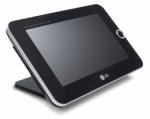
While on a family vacation to Disney World recently, I realized how bad the battery in my laptop had gotten—it would only work for about an hour of DVD watching, so I explored some portable power options. I found a few, but none that added more than a half hour to a laptop's battery time. Discouraged, I said "WTH" and looked at portable DVD players. I found a unique one listed on Circuit City's web site, so I had to get it - the LG DP889 "Portable DVD Player & Digital Photo Frame" (8" widescreen; $229, but I saved some with a 10% coupon). Instead of a lengthy discussion, a list of positives and negatives would be better:

POSITIVES

  • Can view photos.
  • Has a USB port; you can connect flash drives to view photos and listen to music. The manual is not accurate, as it states that a direct camera connection is not supported—it worked well with the two digital cameras I tried.
  • Has a media card slot.
  • Plays MP3s. I copied a bunch to an SD card for my future trips.
  • 256MB onboard memory (used to copy music and pictures from USB or media card).
  • A/V inputs—yes, that's right—inputs.
  • Store a few pictures in the internal memory, set it to slide show, and you have a nice digital photo frame. It is not set up like most portable DVD players, where the screen is on the top and the DVD player is on the bottom; this one has the DVD player behind the screen. The thing that folds in this player is just a tiltable stand
  • Two headphone jacks.
  • Full, clean sound with serious volume.

NEGATIVES

  • Not as efficient as a real MP3 player; will read MP3 tags, but will not index songs and artists by them, so grouping songs into folders is the only way to organize them. I also had to go through and strip out any artist names in file names, as they made song titles virtually impossible to read after being truncated.
  • No Title button on the unit itself. If both music and pictures are found on the same media, it tabs Photos and Music. Not a big deal, except that to switch to the other [Music] tab, you have to use the Title button, which exists only on the remote. Another problem with this is that album art is normally hidden in Windows, but the LG still finds it as pictures, so the Title button is once again needed. I went through and removed all of the hidden album art so the player would only see music files.
  • Battery will not charge if player is being used.
  • Fingerprints are a constant problem.

Overall, I'm very pleased with this player. There are plenty of other options out there (bigger screens; longer battery life), but most of them only play movies. This one lets me also listen to music and view pictures...being able to connect my dSLR directly to it and view its photos is quite handy. And lastly, the A/V input capability—imagine being stuck in an airport, but having this player and a game console. Cool

The bottom line—I highly recommend this one to anyone looking for a portable DVD player. This is much more portable (and practical) than lugging a laptop around just to watch movies.


Browse all 24 entries in this blog


Please log in or register to participate in this community!

Log In

Remember

Not a member? Sign up!

Did you forget your password?

You can also log in using OpenID.

close this window
close this window