OUR NETWORK:TiVo Community Sling Community RoboCommunity My DigitalEntertainer MyOpenRouter MediaSmart Home See all... About UsAdvertiseContact Us

The Tech's Files RSS Feed

A TechLore Blog By zapdbf

Blog Avatar I see technology only after the chalk outline has been drawn on the floor. Follow me through the word of repair and learn the gritty truth about technology.


Why does a fuse blow?

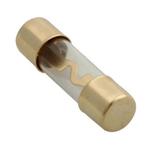
First off we need to understand what a fuse is. A fuse is a safety device, primarily designed to protect something from fire or damage. A normal fuse is simply a small wire running from one electrode to another electrode and encapsulated in some kind of fire proof casing.
 
A fuse should not be confused with a circuit breaker. A circuit breaker has the same purpose as a fuse, but it can be re-set and used again. A fuse has to be replaced when it blows.
Fuses, especially ones found in a television, can be very deceiving and hard to find. They come in many shapes and sizes. Other components like; resistors, or coils, may also do double duty and act like  a fuse. This behavior is engineered into the component.

A fuse under normal conditions will allow the free flow of electricity to the circuit it is feeding. Normally, if everything is working correctly, the fuse has absolutely no effect on the circuit. If the circuit that the fuse is feeding draws too much current, the fuse wire will get very hot, very fast, causing the wire to disintegrate or burn open in one spot.  Once that wire has been broken, no electricity can pass through to the circuit beyond.
It is extremely rare that a fuse will blow without another problem causing it to blow. After all, that is its purpose. It is designed to blow if something else is wrong, especially in a TV or other appliance. If a fuse is blown in a TV, expect that you will need to fix it.

Most of us are used to dealing with fuses, or breakers, in our house. By replacing the fuse, we usually make it all better again. But when you think about it, the fuse only blew because you had the bathroom heater turned on at the same time you had the blow dryer turned on. So you overloaded the circuit. Again, you had to fix something to keep the fuse from blowing, like turning off the heater while you were blow-drying your hair. Replacing the fuse did not fix the problem. Turning off the heater fixed the problem. The fuse was a symptom of the problem. Inside the television you have no control over how much power is being used. So the reason that fuse blew is inside the TV it’s self.


 Power surges from lightning or power line transmission problems can cause a fuse to blow.  The abnormal voltage and current flows in this situation will usually do more damage to the TV, but in some rare cases the fuse is all that has blown. If an internal fuse has blown, it always has to do with a problem in the television.
 
When you replace the fuse, use the same amperage, because increasing the amperage does not help, it just allows the circuit more current, possibly causing a fire. If the circuit keeps blowing a fuse, you have a problem that needs to be addressed and resolved. Don’t mask a problem by trying a higher amperage fuse. This will only make your problem worse.

Sony Recall !

From time to time people have been upset because they feel that their tv or electronic device made by sony should have been re-called. In truth Sony will issue in-warranty maitnance repairs or recalls  that your device needs. If  you registered your product, they will usaly send you a letter outlining the problem and the required repair.  Not everyone will receive this letter.  Sony has a place on their website where you can type in your model number, and it will tell you of any recalls or other important information about your Sony product. I suggust that you visit this site before your warranty runs out. To see if any updates have been issued for your sony products click below. 

http://esupport.sony.com/?ref=http%3A//www.sony.com/index.php

The Pixel Kunumdrum


All televisions have a small display unit of the screen called a pixel; a pixel is the smallest picture element on the screen.  It will produce a number of colors with varying intensity, comprised of three primary colors red, green, and blue. Take a magnifying glass and get real close to your tv and you can see the three separate colors that form a pixel. On the older crt type of televisions an electron beam was scanned across a set of pixels to illuminate the pixel. The pixel was made up of  a phosphor coating that illuminated each of the three pixel elements at different intensities generating the color for that spot.  In all of the new modern displays each pixel is a separate electronic component, independent from the pixel next to it. Because each pixel is on its own, it is possible for just one of these pixels to become defective over time.  It will do one of three things, it will stick on (always emitting light) or stick off (always black) or intermittently stick on or off.  There is no way that a technician can remove the defective pixel and replace it with a good one. If this problem occurs the whole display will have to be changed, The cost of the display is almost equal to the cost of the television when it was new.

        If while your tv is in warranty you develop a pixel problem. The technician does not have free ability to replace your display.  According to the manufacturers a few stuck pixels are acceptable.  The replacement of the screen is determined by complex set of rules.  We have to call the company and they will ask us questions about the problem and determine if it is bad enough to replace the panel. The manufacturers don't tell you about this policy when it comes to display malfunctions, but your screen is divided up into zones, the center being the most sensitive zone.  If the pixel is stuck "on" in the center of the picture where it is emitting a pin prick of light, you are more likely to get it replaced in warranty than if it is stuck off. Based on my experience, I believe it was up to 5 pixels can be stuck off in the center of the picture before replacement is authorized.  More are allowed in the sections not affecting main viewing, with the corners allowed to have the most defective pixels.   DLP types are also prone to this philosophy and problem as well, even though It is a tiny mechanical mirror moving, that mirror can become stuck on or off causing a tiny distortion in the picture that customers will notice. 

                The customer with this problem is usually very upset to find out about this policy.  Arguing with the servicer about this problem will not get you anywhere.  As a rule the customer can get a better response if they complain to the manufacturer themselves.  I am not defending their actions; I am simply stating facts as they are today.  I will let you make your own opinion about this kind of policy. Normally this information only comes to light after your TV has this problem. That is true about most issues with electronic equipment.  Stay tuned to my blog, I will bring you other useful information from the dark side of electronics.


Browse all 9 entries in this blog


Please log in or register to participate in this community!

Log In

Remember

Not a member? Sign up!

Did you forget your password?

You can also log in using OpenID.

close this window
close this window